# Work items

## Introduction to work items

{% hint style="info" %}
This feature is available in business plans only. Please contact our support if you're interested in using it.
{% endhint %}

{% hint style="success" %}
This article explains the types of work items and shows how to create and manage them in day-to-day work.
{% endhint %}

Work items are individual tasks, epics, and stories that contribute to achieving project goals. They can span from minor bug reports, to building new features from scratch, to large epics involving multiple teams and planned for months to come.

## Creating work items

Work items are stored in the **Delivery** module of the application. They can be created manually, or generated from feedback tickets.

### Creating manually

{% stepper %}
{% step %}
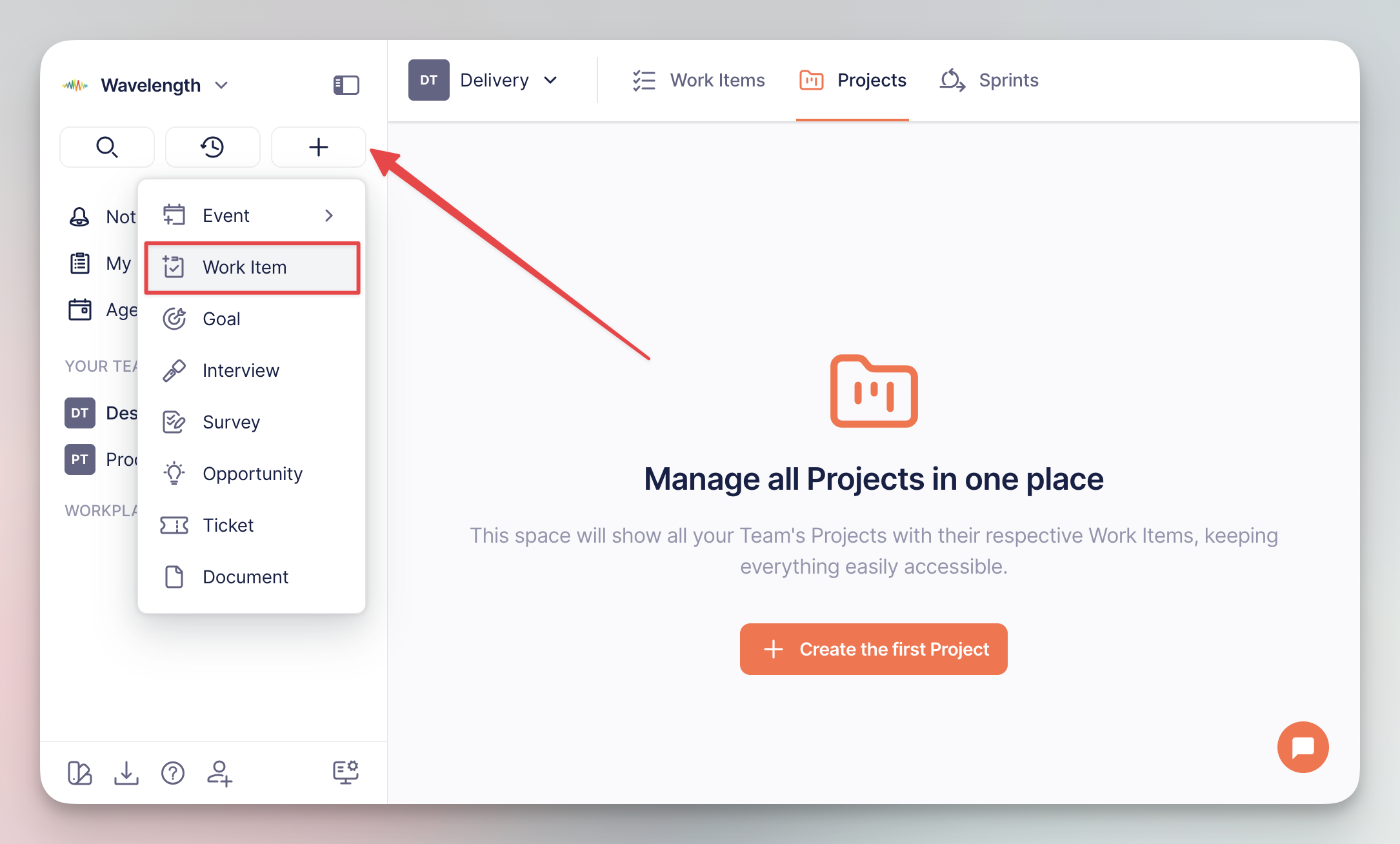
The easiest way to create a work item is from the global add button residing in the left navigation sidebar:

<div align="left"><figure><img src="https://3284049081-files.gitbook.io/~/files/v0/b/gitbook-x-prod.appspot.com/o/spaces%2FvCMXgzPoiE4UXP4jn6B8%2Fuploads%2Fgit-blob-742f2f3638ac0468f925188fb0643816dca27084%2FCleanShot%202025-09-01%20at%2012.51.39%402x.png?alt=media" alt="" width="563"><figcaption><p>Creating from <code>+</code> button</p></figcaption></figure></div>
{% endstep %}

{% step %}
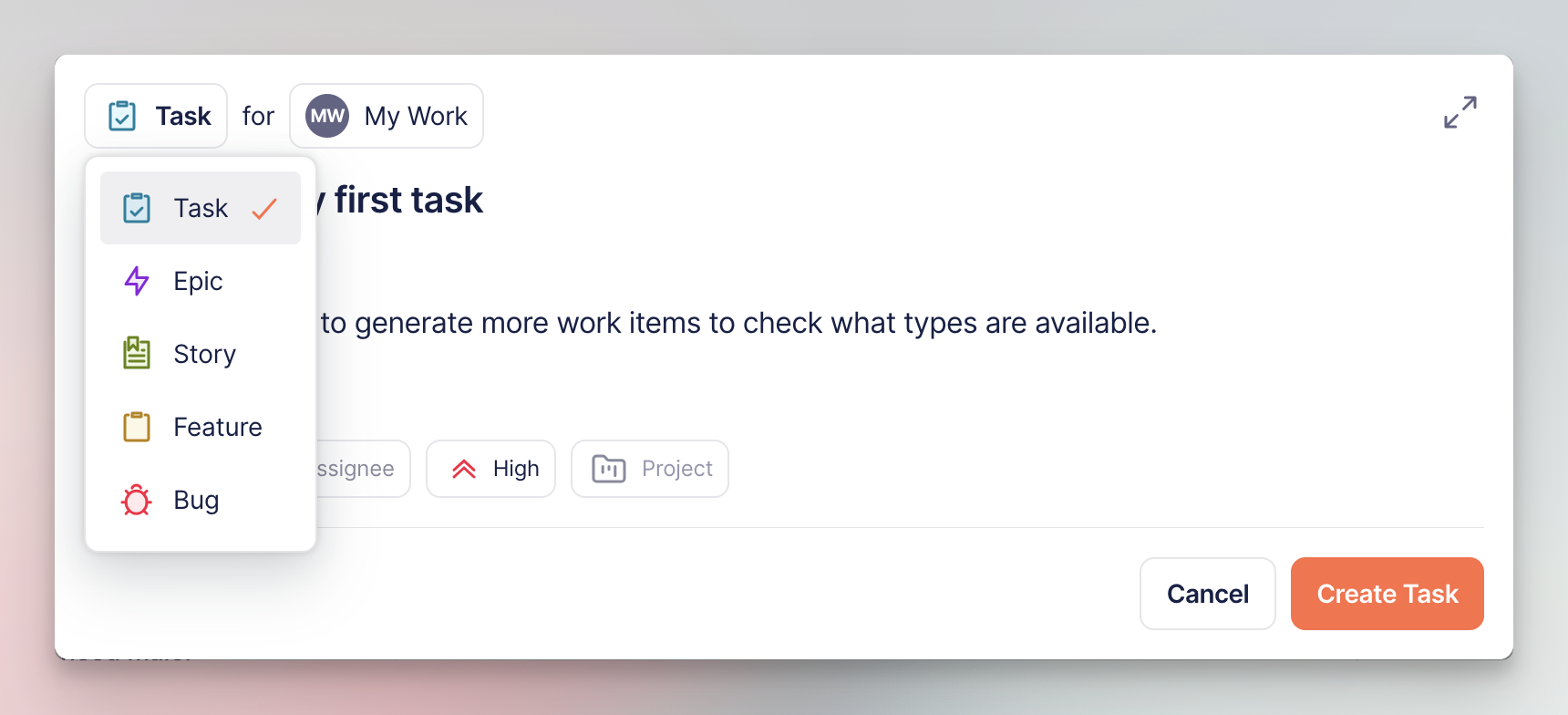
Select the work item type, add description, and configure other properties (status, assignee, priority, parent poject, etc.):

<div align="left"><figure><img src="https://3284049081-files.gitbook.io/~/files/v0/b/gitbook-x-prod.appspot.com/o/spaces%2FvCMXgzPoiE4UXP4jn6B8%2Fuploads%2Fgit-blob-f1e1e81c1eb61224303b541f5b41bac96a5ff40a%2FCleanShot%202025-09-01%20at%2012.43.40%402x.png?alt=media" alt="" width="563"><figcaption><p>Work item configuration screen</p></figcaption></figure></div>
{% endstep %}
{% endstepper %}

### Generating from tickets

[Feedback tickets](https://help.timebook.ai/hc/get-started/discovery/feedback) are the voice of your customers aimed at improving and your product and providing ideas for new features. Each ticket can be duplicated into a work item, which stays connected with the source.

{% stepper %}
{% step %}
Go to Research → Feedback and select the ticket that you want to create the item from.
{% endstep %}

{% step %}
Click the 'Genarate' button and select 'Work item' from the list.
{% endstep %}

{% step %}
Timebook will create the task and attach it to the 'Work items' tab of the ticket.

<div align="left"><figure><img src="https://3284049081-files.gitbook.io/~/files/v0/b/gitbook-x-prod.appspot.com/o/spaces%2FvCMXgzPoiE4UXP4jn6B8%2Fuploads%2Fgit-blob-02ee1dd2fbf65475edefe1d203f82f77ab709549%2Fwork-items-3.png?alt=media" alt="" width="563"><figcaption><p>Generating from feedback tickets</p></figcaption></figure></div>
{% endstep %}
{% endstepper %}

## Types of work items

{% hint style="info" %}
The examples below include use cases from a fictional company providing music streaming services.
{% endhint %}

<table><thead><tr><th width="119.34713745117188">Name</th><th>Description</th><th>Example</th></tr></thead><tbody><tr><td>☑️ <strong>Task</strong></td><td>The smallest manegeable piece of work. Used to break higher-level stories into actionable steps.</td><td><em>Update album artwork API endpoint to support 4K resolution</em></td></tr><tr><td>🐞 <strong>Bug</strong></td><td>Similar to taks, but related directly to resolving issues and errors.</td><td><em>Songs skip to next track when user adjusts volume during playback.</em></td></tr><tr><td>🔖 <strong>Story</strong></td><td>User stories and requirements collected during the <a href="../discovery/feedback">feedback</a> phase.</td><td><em>As a user, I want to create collaborative playlists so that my friends and I can add songs together.</em></td></tr><tr><td>📋 <strong>Feature</strong></td><td>Groups user stories into a single deliverable functionality.</td><td><em>Social playlists: collaborative playlists, playlist sharing, friend activity feed.</em></td></tr><tr><td>⚡️ <strong>Epic</strong></td><td>Multiple features or initiatives organized into a long-term delivery plan.</td><td><em>High-level initiative encompassing social playlists, friend recommendations, and social discovery features.</em></td></tr></tbody></table>

## Statuses

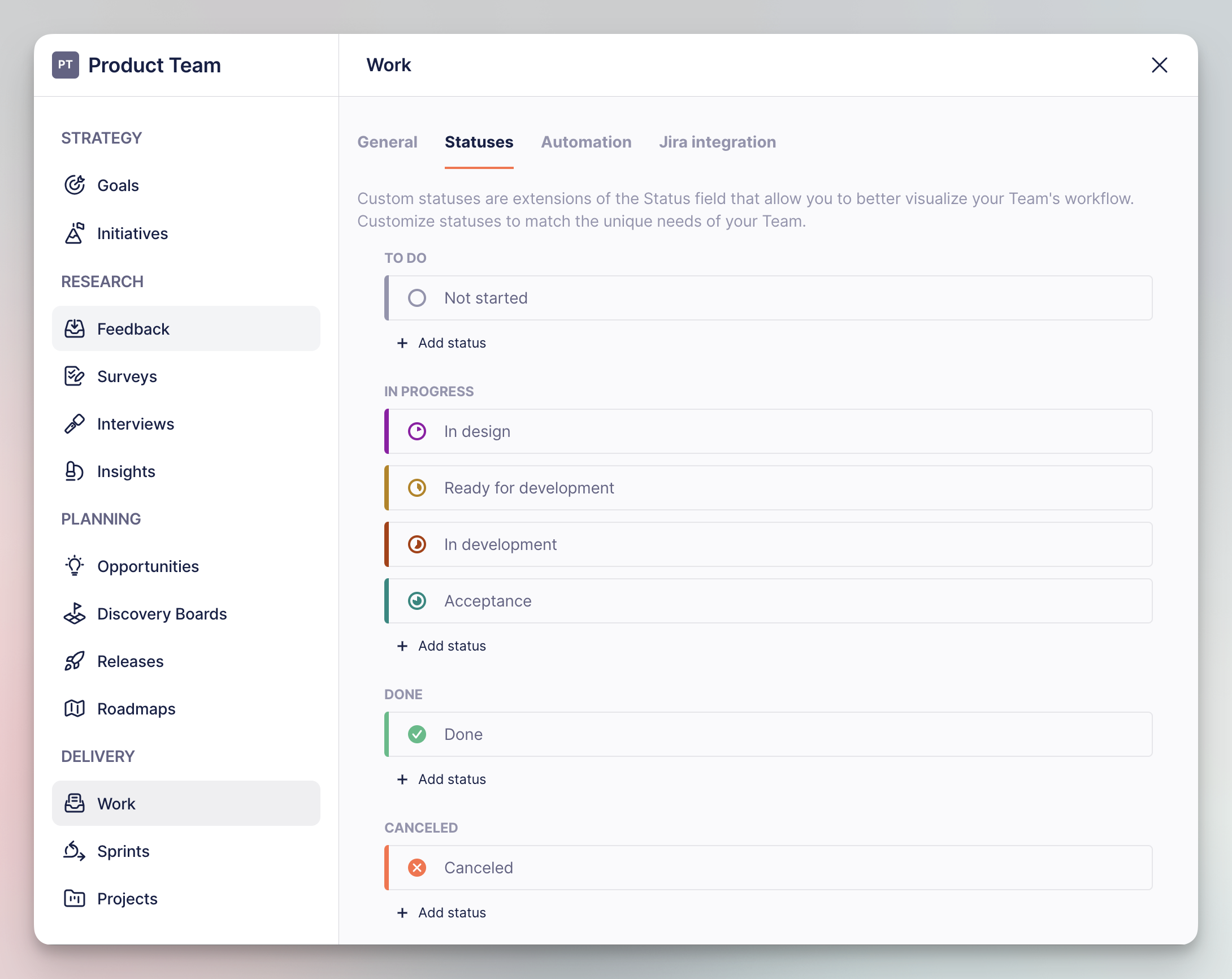
Work items come with a set of four default status types, recognizable to every user of project management software: **To do**, **In progress, Done** and **Canceled**.

You can and add your own statuses to customize the workflow in the **Work** section of your team settings:

<div align="left"><figure><img src="https://3284049081-files.gitbook.io/~/files/v0/b/gitbook-x-prod.appspot.com/o/spaces%2FvCMXgzPoiE4UXP4jn6B8%2Fuploads%2Fgit-blob-ff8cc5988bfbca509528f1203e289849590fee5c%2FCleanShot%202025-09-01%20at%2012.40.45%402x.png?alt=media" alt="" width="563"><figcaption><p>List of work items' statuses in team settings</p></figcaption></figure></div>

## Properties

Work items share a common set of properties used in day-to-day work and project management.

{% hint style="success" %}
You can also user these properties group, sort, and filter your tasks in the 'Manage view' menu.
{% endhint %}

<table><thead><tr><th width="149.66253662109375">Property</th><th>Description</th></tr></thead><tbody><tr><td><strong>Team</strong></td><td>The team assigned to the item.</td></tr><tr><td><strong>Sprint</strong></td><td>The sprint the item is currently assigned to.</td></tr><tr><td><strong>Release</strong></td><td>The release the item is planned to be delivered with.</td></tr><tr><td><strong>Project</strong></td><td>The project holding the item.</td></tr><tr><td><strong>Solution</strong></td><td>The solution to which the item belongs.</td></tr><tr><td><strong>Status</strong></td><td>The current status of the item (to do, in progress, done, etc.)</td></tr><tr><td><strong>Assignee</strong></td><td>The workplace member currently responsible for the progress in the item.</td></tr><tr><td><strong>Priority</strong></td><td>Defines how important the work item is.</td></tr><tr><td><strong>Start date</strong></td><td>The date the team should start working on the item.</td></tr><tr><td><strong>Due date</strong></td><td>The date the team should finish working on the item.</td></tr><tr><td><strong>Estimated time</strong></td><td>Total time assumed for the team to finish working on the item.</td></tr><tr><td><strong>Color</strong></td><td>The color of the item on the calendar and timeline views.</td></tr><tr><td><strong>Git</strong></td><td>Git commits, merge requests, and branches assigned to the item (requires configuring <strong>Automation</strong> in the team settings).</td></tr><tr><td><strong>Story points</strong><br>(story type only)</td><td>The effort required to resolve the story, with scoring similar to the Fibonacci sequence. Also known as task complexity.</td></tr><tr><td><strong>Created by</strong></td><td>The member of the workplace that created the item.</td></tr><tr><td><strong>Date created</strong></td><td>The date the item was created.</td></tr></tbody></table>


---

# Agent Instructions: Querying This Documentation

If you need additional information that is not directly available in this page, you can query the documentation dynamically by asking a question.

Perform an HTTP GET request on the current page URL with the `ask` query parameter:

```
GET https://help.timebook.ai/hc/get-started/delivery/work-items.md?ask=<question>
```

The question should be specific, self-contained, and written in natural language.
The response will contain a direct answer to the question and relevant excerpts and sources from the documentation.

Use this mechanism when the answer is not explicitly present in the current page, you need clarification or additional context, or you want to retrieve related documentation sections.