> For the complete documentation index, see [llms.txt](https://help.timebook.ai/hc/llms.txt). Markdown versions of documentation pages are available by appending `.md` to page URLs; this page is available as [Markdown](https://help.timebook.ai/hc/product-guide/importing-data.md).

# Importing data

Reading time: 4 minutes

## About

{% hint style="success" %}
The following guide will explain how to format input data to import it to Timebook.
{% endhint %}

{% hint style="warning" %}
Fatures marked with `*` are restricted to higher plans.
{% endhint %}

Timebook provides several entry points for data via integrations, including [Intercom](/hc/integrations/intercom.md) tickets, [Slack](/hc/integrations/slack.md) messages, and transcripts from [Zoom](/hc/integrations/zoom.md) meetings.

If you already have data in structured form, you can import it to the following modules:

* [Interviews](/hc/get-started/discovery/interviews.md)
* [Opportunities](/hc/get-started/discovery/opportunities.md)
* [Feedback tickets](/hc/get-started/discovery/feedback.md)
* [Surveys](/hc/get-started/discovery/surveys.md)\*

## Interviews

{% hint style="info" %}
Interviews require a conversation transcript in `.vtt` or `.txt` format.
{% endhint %}

To import your file, click '+New interview' and select the transcript option:

<div align="left"><figure><img src="https://3284049081-files.gitbook.io/~/files/v0/b/gitbook-x-prod.appspot.com/o/spaces%2FvCMXgzPoiE4UXP4jn6B8%2Fuploads%2FO76jC0RUgfiNmLIEvcmy%2FCleanShot%202026-09-01%20at%2016.18.26%402x.png?alt=media&amp;token=d4600f79-fc8a-4fff-8c53-34061f2ff9e3" alt="" width="563"><figcaption></figcaption></figure></div>

Timebook will analyze the file, parse the formatting to make it easier to read, and ask you map the speakers as interviewers and participants:

<div align="left"><figure><img src="https://3284049081-files.gitbook.io/~/files/v0/b/gitbook-x-prod.appspot.com/o/spaces%2FvCMXgzPoiE4UXP4jn6B8%2Fuploads%2F2m4V1XoXpmtUmWsenrK0%2Fimport-interviews-mapping.png?alt=media&amp;token=b2e078ef-4d06-4ebc-b871-445e89eb8f8a" alt="" width="563"><figcaption></figcaption></figure></div>

## Opportunities

{% hint style="info" %}
Opportunities require data in `.csv` format.
{% endhint %}

The import option is available in the top-right corner of the Opportunities page:

<figure><img src="https://3284049081-files.gitbook.io/~/files/v0/b/gitbook-x-prod.appspot.com/o/spaces%2FvCMXgzPoiE4UXP4jn6B8%2Fuploads%2FY1PlW95SRXH1Porre3PH%2FCleanShot%202026-09-04%20at%2015.41.10%402x.png?alt=media&amp;token=79d9db32-3fd7-46e1-9012-dc85a7f89e8e" alt=""><figcaption></figcaption></figure>

### Example

<table><thead><tr><th width="155.52001953125">Field</th><th>Description</th><th>Example</th></tr></thead><tbody><tr><td><strong>Title</strong></td><td></td><td>Faster onboarding</td></tr><tr><td><strong>Problem</strong></td><td></td><td>New users get lost in the first session</td></tr><tr><td><strong>Notes</strong></td><td></td><td></td></tr><tr><td><strong>Desired outcome</strong></td><td></td><td>Users complete setup in under 10 minutes</td></tr><tr><td><strong>Importance</strong></td><td></td><td><code>–</code> / <code>Very low</code> / <code>Low</code> / <code>Moderate</code> / <code>High</code> / <code>Critical</code></td></tr><tr><td> <strong>Current satisfaction</strong></td><td></td><td><code>–</code> / <code>Very dissatisfied</code>/ <code>Dissatisfied</code> / <code>Neutral</code> / <code>Satisfied</code> / <code>Very satisfied</code></td></tr><tr><td><strong>Status</strong></td><td></td><td><code>Draft</code> / <code>Backlog</code> / <code>In Discovery</code> /  <code>In Delivery</code> / <code>Addressed</code> / <code>Declined</code></td></tr></tbody></table>

```
Title,Problem,Desired outcome,Importance,Current satisfaction,Status
Faster onboarding,New users get lost in the first session,Users complete setup in under 10 minutes,5,2,To do
Better search,People cannot find old interviews,Search returns relevant interviews quickly,4,3,In Progress
Mobile notifications,Users miss comments on mobile,Users get notified about mentions on their phone,3,1,To do
```

## Feedback tickets

{% hint style="info" %}
Tickets require data in `.csv` format.
{% endhint %}

The import option is availabie in the top-right corner of the Feedback inbox:

<div align="left"><figure><img src="https://3284049081-files.gitbook.io/~/files/v0/b/gitbook-x-prod.appspot.com/o/spaces%2FvCMXgzPoiE4UXP4jn6B8%2Fuploads%2FQ0aSTniWYQISnLwIXO5p%2Fimport-feedback.png?alt=media&amp;token=095e5237-fefb-4fda-8181-4d780103a604" alt="" width="563"><figcaption></figcaption></figure></div>

### Example

Here's a schema of how feedback ticket data is parsed:

<table><thead><tr><th width="155.52001953125">Field</th><th>Description</th><th>Example</th></tr></thead><tbody><tr><td><strong>Title</strong></td><td>The title of the ticket.</td><td>Login fails on Safari</td></tr><tr><td><strong>Description</strong></td><td>The contents of the feedback ticket.</td><td>"Customer cannot sign in on Safari 18.<br>Session expires after a few seconds."</td></tr><tr><td><strong>Assignee</strong></td><td>The workplace member to whom the ticket is assigned.</td><td>joe_doe@company.com</td></tr><tr><td><strong>Status</strong></td><td>The system status of the ticket.</td><td><code>In review</code> / <code>In progress</code> / <code>Done</code> / <code>Declined</code></td></tr><tr><td> <strong>Severity</strong></td><td>The severity (priority) of the ticket.</td><td><code>Low</code> / <code>Normal</code> / <code>High</code> / <code>Critical</code> </td></tr></tbody></table>

And this is how your `.csv` should be formatted:

```csv
Title,Description,Assignee,Status,Severity
Login fails on Safari,"Customer cannot sign in on Safari 18. Session expires after a few seconds.",joe_doe@company.com,In review,High
CSV export is empty,Export from reports returns 0 rows for last month.,joe_doe@company.com,In progress,Normal
Mobile push missing,User does not get notified about new comments on iPhone.,joe_doe@company.com,Done,Critical
Dark mode contrast,Text in the sidebar is hard to read in dark mode.,joe_doe@company.com,Declined,Low
```

## **Surveys**

{% hint style="info" %}
Surveys require data in `.csv` format.
{% endhint %}

To import your file, click the '+New survey' button. Select the file to upload, or paste the data directly:

<figure><img src="https://3284049081-files.gitbook.io/~/files/v0/b/gitbook-x-prod.appspot.com/o/spaces%2FvCMXgzPoiE4UXP4jn6B8%2Fuploads%2FDk23efoHSLlIbT8fQ5wh%2FCleanShot%202026-09-04%20at%2013.57.44.png?alt=media&amp;token=527dd847-046a-462f-b156-763ebb647014" alt=""><figcaption></figcaption></figure>

### Example

Here's an example of customer satisfaction survey that can be saved to `.csv` as it is:

<table><thead><tr><th width="155.52001953125">Respondent</th><th>Date submitted</th><th>Q1: Overall  satisfaction</th><th>Q2: Most used area</th><th>Q3: Suggested improvement</th></tr></thead><tbody><tr><td>Anna Smith</td><td>2026-08-12</td><td>4</td><td>Insights</td><td>Search could surface older interviews faster</td></tr><tr><td>Mark Tayler</td><td>2026-08-14</td><td>5</td><td>Opportunities</td><td>Would like bulk-editing for tags</td></tr><tr><td>Julia Brown</td><td>2026-08-15</td><td>3</td><td>Reports</td><td>Report exports take too long</td></tr><tr><td>Thomas Wilson</td><td>2026-08-19</td><td><code>4</code></td><td>Interviews</td><td>Nothing major, transcript search works well</td></tr></tbody></table>

And here's the questionnaire reproduced into a `.csv` file. Make sure that:

* first row contain the questions
* remaining rows contain the answers

```
Respondent,Date submitted,Q1: Overall satisfaction,Q2: Most used area,Q3: Suggested improvement
Anna Smith,2026-08-12,4,Insights,Search could surface older interviews faster
Mark Taylor,2026-08-14,5,Opportunities,Would like bulk-editing for tags
Julia Brown,2026-08-15,3,Reporting,Report exports take too long to load
Thomas Wilson,2026-08-19,4,Interviews,Nothing major, transcript search works well
```

## **Troubleshooting**

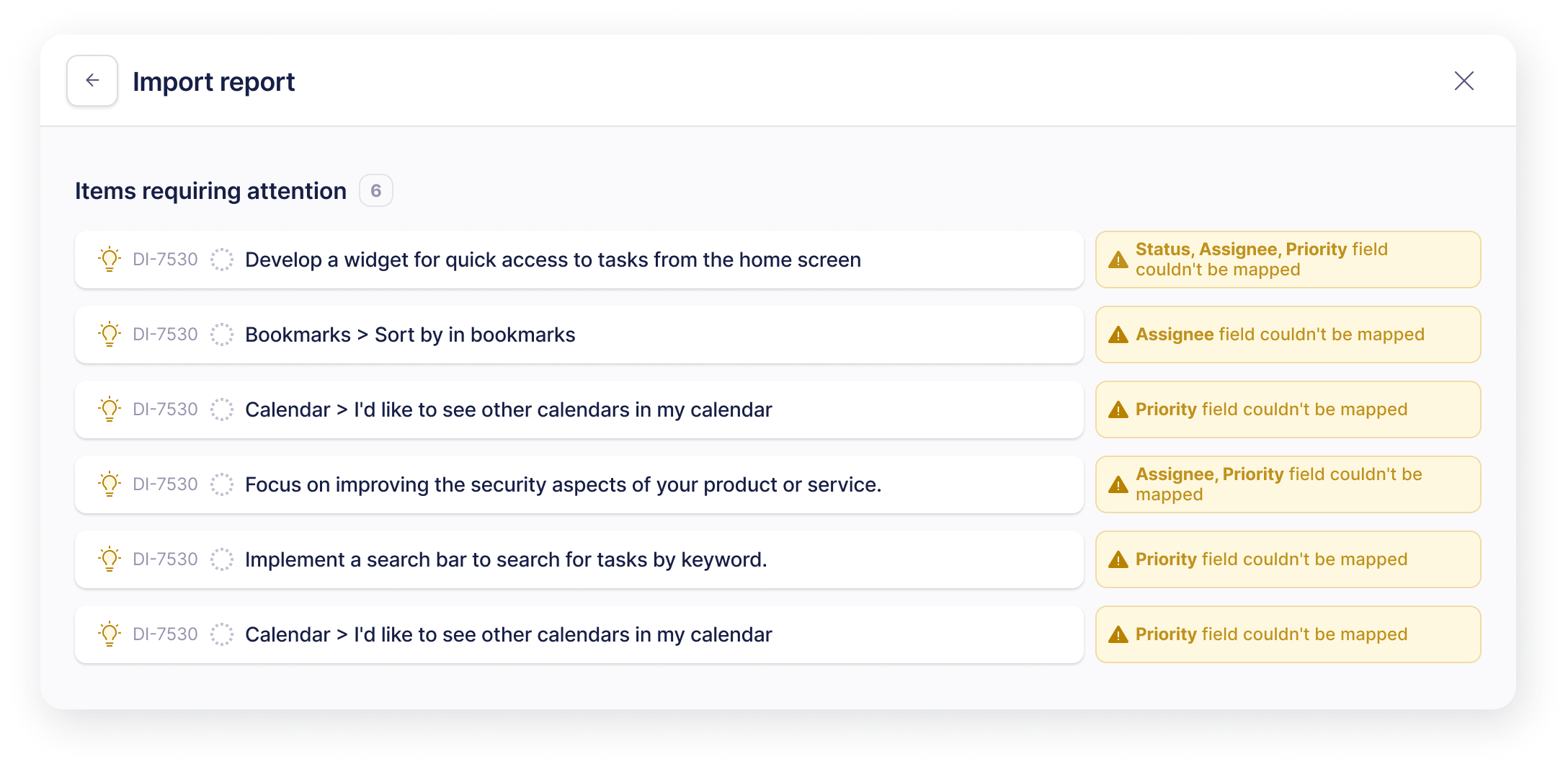
If your report requires manual field mapping, you will receive a report once the parsing is done. Fields that could not be mapped will be listed alongise their parent item:

<div align="left"><figure><img src="https://3284049081-files.gitbook.io/~/files/v0/b/gitbook-x-prod.appspot.com/o/spaces%2FvCMXgzPoiE4UXP4jn6B8%2Fuploads%2Fgit-blob-19ca464cc0d83ec7c7da8fa840ec9caf707a9b4b%2Fimage.png?alt=media" alt=""><figcaption><p>The import report highlights items that need your attention, showing which fields couldn’t be mapped.</p></figcaption></figure></div>